

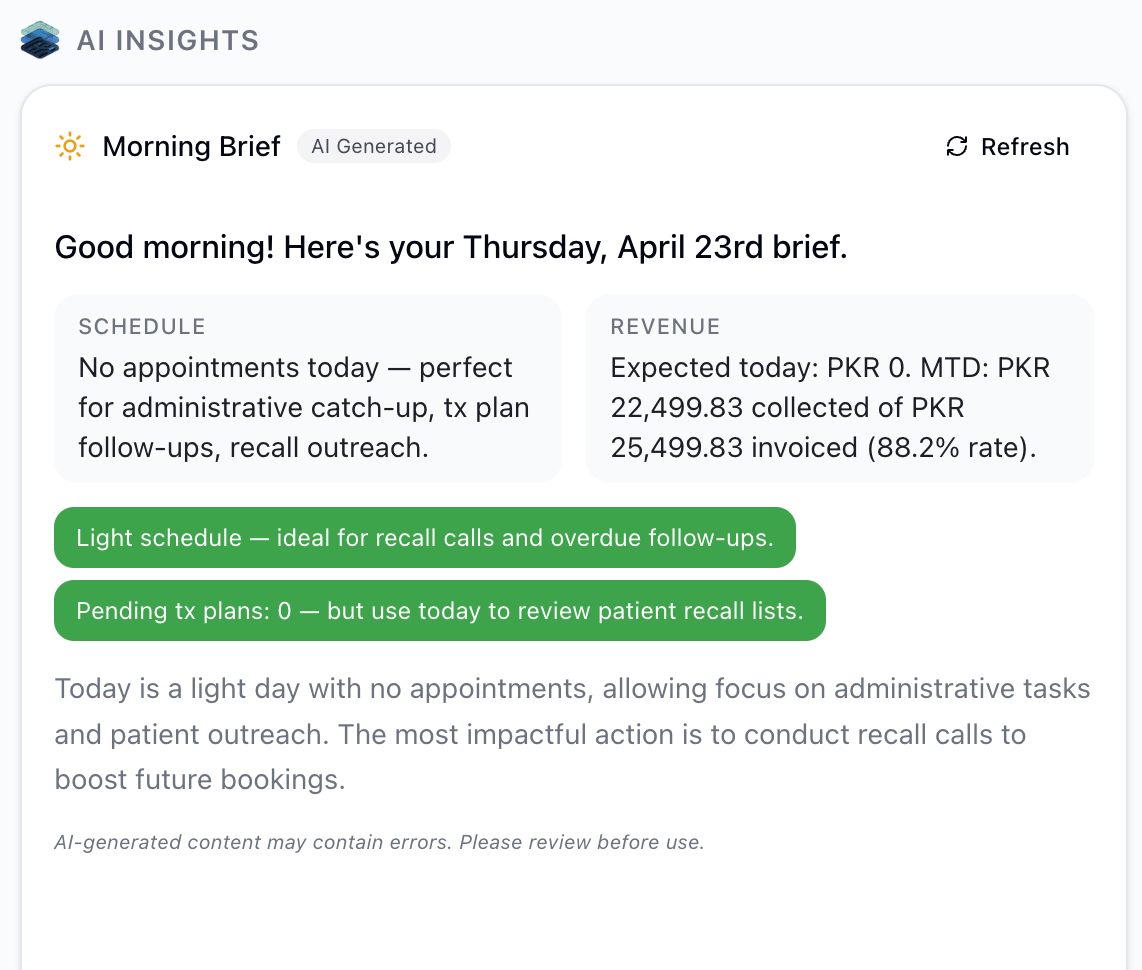
What the brief covers
Personalized greeting
Personalized greeting
The brief opens with a greeting that includes your name and the current date, setting context for the day ahead.
Schedule overview
Schedule overview
How many appointments are booked for today, broken down by confirmation status. You’ll immediately see if there are unconfirmed appointments that need follow-up.
Revenue snapshot
Revenue snapshot
Three key numbers: expected revenue for today (based on scheduled appointments), month-to-date collections, and month-to-date invoiced amounts. This gives you a quick read on how the month is tracking.
Alerts
Alerts
Issues that need your attention right now. Examples include unconfirmed appointments for today, overdue invoices that haven’t been followed up on, and pending treatment plans approaching expiration.
Opportunities
Opportunities
Revenue and engagement opportunities the AI has identified. These might include pending treatment plans that could convert with a follow-up call, light schedule days that are good for recall outreach, or patterns suggesting a good time for a specific campaign.
Summary paragraph
Summary paragraph
A closing paragraph that ties everything together with a brief assessment of the day’s outlook.
How to access the daily brief
1
Open Ruby Insights
Click Ruby Insights in the sidebar.
2
View the Daily Brief
The daily brief sits at the top of the Plan ahead section. If no one in your clinic has generated it yet today, click the generate button.
3
Review and act
Use the alerts and opportunities sections to prioritize your morning — confirm appointments, follow up on overdue invoices, or call patients with pending plans.
Revenue metrics explained
The revenue snapshot in the daily brief uses specific calculations to ensure accuracy:- Expected revenue today — based on scheduled appointments and their associated treatment values
- MTD collected — actual payments received so far this month
- MTD invoiced — total invoices issued this month
- Collection rate — calculated only on invoices whose due date has already passed
Invoices with future installment due dates are excluded from the collection rate calculation. This prevents installment-based payment plans from artificially lowering your collection rate when payments aren’t yet due.
Caching and refresh
The daily brief is cached per clinic and shared across all admins. The first person to open Ruby Insights each day generates it, and everyone else in the clinic sees the same brief instantly. A “Cached · X ago” badge shows when it was last generated, with a Refresh button alongside it. The cache refreshes automatically at the end of the working day (Pakistan time) or after 24 hours. If you need fresh data — for example, after confirming several appointments or processing a batch of payments — use the Refresh button to regenerate. A refresh counts as a new generation.Practical scenarios
Morning huddle
Pull up the daily brief during your team’s morning meeting to align everyone on the day’s priorities, outstanding items, and revenue targets.
End-of-day check
Refresh the brief at the end of the day to see updated collection figures and confirm that action items from the morning have been addressed.
Slow day planning
When the brief shows a light schedule, use the opportunities section to identify recall patients or pending treatment plans worth a follow-up call.
Month-end review
Toward the end of the month, the MTD figures in the daily brief help you quickly assess whether you’re on track to meet revenue goals.
Related articles
- AI Overview — rate limits, AI principles, and the full list of AI features
- Revenue Forecast — a 30-day forward-looking revenue prediction
- Payment Reminders — follow up on the overdue invoices flagged in your brief
- Treatment Follow-ups — act on the pending treatment plans the brief highlights